Posts

Showing posts from June, 2025

Mastering the “Input Series” Function in NinjaTrader

Image
 πŸ” A must-know feature for every advanced trader and strategy developer Our latest tutorial dives deep into one of the most powerful — yet often overlooked — features in NinjaTrader: the Input Series . With it, you can go far beyond basic indicators and unlock serious customization: πŸ“Œ What you’ll learn in the video : How to apply indicators like SMA using different price components (Close, High, Low, Median, etc.) How to build price channels using SMA over Highs and Lows How to nest indicators (e.g., SMA of Volume or Max of an SMA) How to detect whether an indicator's signal is a plot , which is crucial for automation with NinjaScript, Builder, or Markers πŸ’‘ Bonus: We show you how to visualize these nested plots and test if signals are copyable and automatable — a key step in building robust strategies. πŸ“Ί Watch the full tutorial here :  πŸ’¬ Join our free Discord room (link in the video description) if you have questions or want to connect with fellow trade...

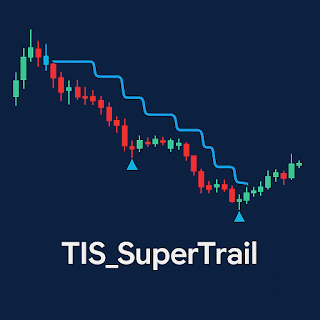
🎯 Introducing TIS_SuperTrail – A Powerful Trailing Stop Indicator for NinjaTrader 8

Image
 πŸŽ― Introducing TIS_SuperTrail – A Powerful Trailing Stop Indicator for NinjaTrader 8 The TIS_SuperTrail is a newly released indicator designed to help traders manage open positions using dynamic trailing stops , while also serving as a trend filter for entry signals. πŸ“Œ Key features: πŸ”΅ Blue line for uptrends, πŸ”΄ red line for downtrends Automatic exit signals: End Long and End Short Uses ATR (Average True Range) to measure volatility Uses HMA (Hull Moving Average) to define and smooth trend direction Adjustable parameters: ATR period, HMA period, and a multiplier to customize line distance and sensitivity πŸ’‘ Trendlines only move in one direction (up or down) and the trend changes only if price closes beyond the trendline , helping reduce false signals and improve trade management. πŸ”§ Easily integrate with Strategy Builder , NinjaScript , or Markers for filtering, logic conditions, or automated exits. πŸ“½️ In the video, you'll see real chart examples and how ...

πŸš€ TIS_SuperTrail: Ride the Trend, Protect Your Profits with Precision

Image
 πŸš€ TIS_SuperTrail : Ride the Trend, Protect Your Profits with Precision Are you tired of cutting your trades too early, only to watch the price explode in your original direction? Do you often second-guess your exits, constantly wondering if it's too soon or too late? With TIS_SuperTrail , those doubts are over. This adaptive trailing stop indicator for NinjaTrader 8 is designed to help you follow the trend confidently while securing your profits with a visual, rule-based approach. πŸ” What Makes TIS_SuperTrail Unique? Unlike traditional stop indicators, TIS_SuperTrail combines the strength of ATR-based volatility detection with the smoothness of Hull Moving Average logic to dynamically adjust to market behavior. Key features include: Color-coded trend line: A clean blue line signals an active uptrend, while red marks a strong downtrend. You’ll always know where the market stands. Automatic arrows for trend changes: No need to overanalyze—clear arrows show you w...

🎯 How to Automatically Detect Price Bounces in NinjaTrader 8

Image
 πŸŽ― How to Automatically Detect Price Bounces in NinjaTrader 8 In this new video from The Indicator Store , you'll learn how to automatically detect price bounces on indicator lines , like the VWAP, using Markers — no coding required. What you'll discover: ✅ How to define a bounce pattern using candlesticks ✅ How to copy any indicator line for reference ✅ How to create buy/sell signals visually ✅ How to filter out false signals with advanced conditions ✅ How to automate bounce detection without using NinjaScript Whether you're just starting out or optimizing your current strategies, this method helps you find clearer and more accurate entry points. πŸ“½️ Watch the full video here:  Have questions or want to dive deeper? Join our free Discord channel (link in the video description) and connect with our active trading community.

🎯 Master ATM in NinjaTrader: Split Targets, Break Even, and Trailing Stops Made Easy

Image
 πŸŽ―In this new tutorial by The Indicator Store , you'll learn how to take full control of your trades using ATM (Advanced Trade Management) in NinjaTrader 8. With ATM, you can: ✅ Split your trade into multiple targets ✅ Set auto break-even after hitting target 1 ✅ Apply custom trailing stops that adapt to price action ✅ Simulate the ATM behavior before going live ✅ Combine ATM with Markers for fully automated signals and intelligent reversals We guide you through how to measure in ticks, define stop strategies, and test your setup with simulated data. Whether you're a beginner or advanced trader, this setup can take your trading to the next level. πŸ‘‰ Watch the full video and start managing trades like a pro : 

🧠 What is the EDGE Indicator?

Image
 πŸ§  What is the EDGE Indicator? EDGE is a powerful entry system designed to trade EMA bounces with visual logic and smart filters. Available exclusively at The Indicator Store for NinjaTrader 8 , it helps you pinpoint high-probability entries—without writing a single line of code. 🎯 How does it work ? EDGE uses: An Exponential Moving Average (EMA) as the bounce zone. A Donchian Channel to filter market bias. Smart candle-based logic to identify the right moment to enter. 🧩 Two entry modes: Setup 1 – First Touch: The current bar touches the EMA, and the previous one didn’t. Setup 2 – Rejection: The current bar moves away from the EMA, after the previous one touched it. You can use each setup independently or combine both. πŸ” Optional filters : Bar color filter: Enter long on green bars, short on red bars. Close confirmation filter: Only trigger signals if the bar closes on the correct side. Repetition filter: Choose to allow multiple sig...

πŸ“˜ How to Build a Simple Trading Strategy in NinjaTrader Using Standard Indicators

Image
   How to Build a Simple Trading Strategy in NinjaTrader Using Standard Indicators If you’re just starting out with NinjaTrader or want to create a reliable strategy without coding , this guide is for you. In this post, we'll walk through a simple trading strategy using built-in indicators only — no custom scripts required. 🎯 Strategy Overview This setup combines a Stochastic Oscillator for signal generation with a Hull Moving Average (HMA) and the Momentum indicator to filter trades based on trend direction. It can be used manually or automated using our Markers tools. πŸ”§ Tools You'll Need Indicator Purpose Stochastic (K=7)           Entry signals at overbought/oversold HMA (Period 100)         Trend detection Momentum    Measures slope of the HMA πŸ› ️ Step-by-Step: Build the Strategy 1. Generate Signals with the Stochastic Oscillator Set K=7, D=1 (to overlap both lines). Entry signals: ...