Monday, May 12, 2025

πŸ” TIS Reversal: Advanced Reversal Strategy with Filters in NinjaTrader 8


 In this new video from The Indicator Store, we present an updated walkthrough of the TIS Reversal indicator — a powerful tool designed to detect potential market reversal points and enhance decision-making in your trading strategies.


🧠 What is TIS Reversal?

TIS Reversal is an indicator that generates reversal signals based on technical conditions and additional filters, allowing traders to operate with more precision and control.


🧰 Available Filters

The indicator includes a variety of customizable filters you can activate based on your trading style:

  • πŸ“‰ EMA Trend: Enable signals depending on whether price is above or below an exponential moving average.

  • πŸ”Ί EMA Slope: Filters signals based on the slope of the EMA (positive for longs, negative for shorts).

  • πŸ“ Linear Regression: Fine-tunes signals to avoid false entries in sideways markets.

  • πŸ•―️ Pin Bar Filter: Trigger signals only when a candle has a distinct wick (useful at key reversal zones).

  • 🟑 Confirmed vs Unconfirmed Signals: Optionally show only confirmed signals or include early, unconfirmed ones for aggressive setups.


πŸš€ Alternate Entry: RBO (Reversal Breakout Order)

In addition to the classic entry method, TIS Reversal includes a powerful alternative:
RBO, which waits for a breakout after the initial reversal signal to confirm the move.

✅ Perfect for traders who want extra confirmation in volatile environments.
πŸ“ You can define:

  • The breakout distance (in ticks)

  • How many bars to wait before the entry expires


πŸ“Š Optimization in Strategy Analyzer

The indicator exports all signals as plots, making it easy to:

  • Build your own strategies using the Strategy Builder or NinjaScript

  • Backtest multiple combinations of filters

  • Optimize parameters with real-time results

It also includes the option for symmetrical overbought/oversold levels, simplifying the optimization process.


πŸ“Œ Final Thoughts

TIS Reversal is more than just a reversal signal tool. Thanks to its flexibility, filtering system, and RBO confirmation logic, it becomes a complete solution for traders seeking precision and adaptability.

πŸ‘‰ Comes with a built-in strategy and full NinjaScript compatibility.


#NinjaTrader#ReversalStrategy#TradingIndicators#DayTrading#TechnicalAnalysis#TISReversal#BreakoutTrading#NinjaScript#TradingTools#StrategyAnalyzer#PriceAction#PinBar#ReversalSignals#FuturesTrading

Tuesday, May 6, 2025

 πŸ§  Combining Trading Signals in NinjaTrader 8: Confluence & EAt The Indicator Store, we’re always exploring ways to help traders design smarter, more accurate setups. In this post, we’ll show how to combine signals from multiple systems in NinjaTrader 8 using two simple but powerful techniques:

✅ Signal Confluence
πŸ”— Event Chaining

Whether you’re using simple plots or advanced Marker Logic, this tutorial will help you take your strategy to the next level.


🎯 What Is Signal Confluence?

Imagine you’re using two systems that generate entry signals — one based on a trend filter and another on pattern recognition.
Instead of triggering trades on each individual signal, you want to act only when both align within a short time window.

πŸ“Œ Use Case:

  • ✅ System A shows a short signal (small triangle)

  • ✅ System B shows another short signal (big triangle)

  • ✅ But they’re a few bars apart…

  • ❗ We want to trigger only if both signals appear within 3 bars


πŸ” Method 1: Using the MAX Indicator for Confluence

With Markers, if your signal is a Plot, you can use the MAX indicator to “extend” its presence over N bars.

πŸ› ️ Steps:

  1. Add the MAX indicator to your chart

  2. Input the signal plot (e.g. “Signal Down”)

  3. Set the time window (e.g. 4 bars)

  4. Repeat for each signal

  5. When both MAX plots > 0 → πŸ”₯ You have confluence

🎯 Result: You can now detect when both signals appear close in time.


πŸ”— Method 2: Chaining Events with Marker Logic

What if you want to detect when one signal prepares the ground for the next?

For example:

“Only look for a big triangle after a small triangle has appeared.”

This is where Marker Copy + Marker Logic come into play.

πŸ› ️ Steps:

  1. Use Marker Copy to convert each signal into a variable

  2. Use Marker Logic to check if variable A (small triangle) > 0

  3. Optionally, use Sustain to keep that condition active for N bars

  4. Use a second logic to detect when variable B (big triangle) also > 0

  5. Combine both results → Create your custom entry signal


πŸ’‘ Why This Is Powerful

✅ Helps filter out noise
✅ Allows you to design flexible multi-signal strategies
✅ Works across multiple charts or instruments
✅ Lets you trigger orders only when the market aligns with your logic


πŸ“½️ Watch the Full Video Tutorial

πŸŽ₯ 


Learn how to use both methods step by step with real chart examples.vent Chaining with Markers


πŸ“£ Need Help?

πŸ’¬ Join our free Discord community


Get support, share setups, and learn from other traders. Link in the video description.


 Markers Pro 2025: Instantly Convert Drawing Objects into Plots in NinjaTrader 8

🎯 What’s New in Markers Pro 2025?

Markers Pro 2025 introduces a powerful new feature: the ability to instantly convert drawing objects into live plots inside NinjaTrader 8. This means lines, arrows, zones, or any graphical element you draw can now become dynamic inputs for your trading strategies.


🧩 Why It Matters

πŸš€ Bridges Manual and Automated Trading
Convert hand-drawn analysis into real-time signals without writing code.

πŸ”„ Full Integration with the Markers Ecosystem
Use your plots in tools like Marker Logic, Paint, and Copy.

🧠 Empowers Visual Traders
You draw it, Markers Pro makes it actionable.


⚙️ How It Works

  1. πŸ–Š️ Draw any object on the chart (line, ray, zone, etc.)

  2. ➕ Attach Markers Pro 2025 to the chart

  3. ✅ Enable "Convert Objects to Plots"

  4. πŸ“Š Use those plots across your strategies and indicators

You can now:

  • Trigger entries and exits based on drawn levels

  • Use your visual analysis in logic builders

  • Export variables like entry price, target, and stop


πŸ”„ Example Use Case

Imagine you draw a custom support line. With this tool, that line becomes:

  • πŸ“ˆ A live plot

  • πŸ” Exportable as a variable

  • 🧠 Usable in automated logic

Multiple accounts? No problem. Combine this with the Trade Copier function to send those signals to different setups with different ATM strategies — each fully independent.


πŸ“Œ Key Features Recap

✅ Instantly turn drawing objects into live data
✅ Use them in logic, painting, or exporting to variables
✅ Combine with Trade Copier for multi-account execution
✅ Keep full control of styling, labeling, and risk per instance


πŸ“š Learn More

This is just one of the many new features in Markers Pro 2025. Stay tuned for upcoming tutorials where we’ll explore how to combine this feature with other tools like Marker Logic and Marker to Plot.

πŸ’¬ Got questions? Drop a comment below or visit our support page.


πŸ”– Hashtags

#MarkersPro2025 #DrawingToPlot #NinjaTrader8 #AutomatedTrading #VisualTrading #NoCodeTrading #TradeCopier #TradingTools #StrategyBuilder


🧭 Ready to upgrade your strategy?
Visit our website and get started with Markers Pro 2025 today!

                                    https://theindicatormarket.com/depot/Markers_System


Monday, May 5, 2025


Markers Pro 2025 – New Trade Copier Tool Explained

Discover the power of Markers Pro 2025 for NinjaTrader 8 and learn how to automate signals and strategies across multiple charts and accounts.

This video introduces Markers Pro 2025, the upgraded version of our tool for the NinjaTrader 8 platform. One of the most important new features is the Trade Copier, which allows you to replicate signals generated by an indicator across multiple accounts simultaneously — each with its own risk management settings via ATMs (Automated Trade Management).

Another key addition is the ability to export position and order data — including entries, targets, and stops — to global variables, enabling you to monitor the status of a strategy from other instances of Markers, even on different charts.

The video demonstrates these features using signals based on the slope of a moving average, showing how the trade copier and variable access enhance flexibility and control over your trading setups.


🧩 Key topics 

  • Trade copying between accounts with individual ATM settings

  • Exporting data to global variables

  • Signal-based automation

  • Multi-chart control and cross-strategy monitoring

#NinjaTrader #Markers2025 #TradeCopier #AutomatedTrading #TradingTools 
#FuturesTrading #DayTrading #AlgoTrading #TradingSoftware #NinjaTrader8


Friday, March 14, 2025

Combo TIS_ATR_Trend + Signal Automator for Tradingview

 This combo includes :

  • Indicator TIS_ATR_Trend ( for Tradingview )

  • Signal Automator ( for Tradingview )


Follow us for more info at our Chat Room on Discord : The Indicator Store Chat Room

At the Channel : #tradingview


Thursday, October 24, 2024

Setup Darvas Squeeze - The Best Indicator Combo for NinjaTrader 8


This setup is the confluence of 2 different Trade Setups :


Setup #1 : Darvas


The Darvas Indicator is included with NinjaTrader and it draw 2 lines as shown on the picture

When the price crosses one of the lines it is a signal.

The only special consideration about this indicator is that it redraws, so what we see on the Chart is not what is visible real time, but once the box is drawn in real time, if the price breaks it we have a signal.

This system has no parameters, so the only variable we have is the timeframe, and also it is suggested to filter it with some other tool, as we are doing here.


Setup #2 : Squeeze


This setup uses 2 indicators, also present on NinjaTrader or any standard platform ; 

  • Bollinger
  • Keltner Channel
The Bollinger envelope lines visible in orange on the picture, are following a simple moving average of the Close.
The distance between the upper envelope and the midline is X times the Std Deviation of the last N Bars, where N is the Period of the SMA ( Simple Moving Average )

The Keltner envelope lines visible in Cyan on the picture, are following a simple moving average of the Median.
The distance between the upper envelope and the midline is Y times the ATR of the last N Bars, where N is the Period of the SMA ( Simple Moving Average )

As we can see on the picture the center line of both envelopes is slightly different because both are SMA's with the same Period, but one is looking at the Closes while the other at the Medians, but the difference can be ignored as it is less than 1 tick.

As we can see also on the picture, the are where the market is on sideways the bollinger ( blue lines ) is inside the keltner ( cyan lines ).
We will name those as squeeze bars.
When the Bollinger gets outside of the Keltner we get a Squeeze Signal.
Those Squeeze Signals dont have direction, so we need to decide if entering long or short by looking somewhere else.
One possible method is looking at the slope of the midline, so we take longs or shorts depending if the slope is positive or negative.
Another option is using a different trade setup as we are doing here :

On the Darvas Squeeze Combo we search for a Squeeze Signal ( with no direction ) near a Darvas Signal ( which has a direction ). And when both signals are close enough, at no more than Z Bars of distance then we have a combo signal.


Custom Indicator TIS_Darvas_Squeeze

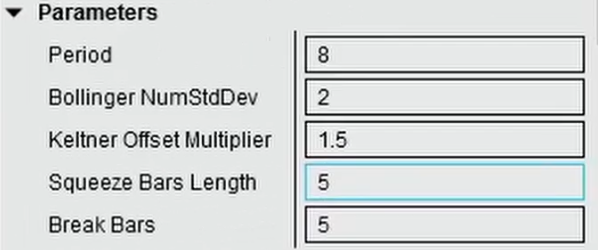
The Parameters of this indicator allow to define any of the Darvas, Bollinger, Keltner settings and also some parameters of the Setup :
  • Period : this is the Period of the SMA, Bollinger & Keltner, the ATR ( used by Keltner ) and Std Dev ( used by Bollinger )
  • Bollinger NumStdDev : is the multiplier of the Std Dev used on the Bollinger
  • Keltner Offset Multiplier : is the multiplier of the ATR used on the Keltner.
  • Squeeze Bars Length : is the number of squeeze bars required to trigger a Squeeze Signal
  • Break Bars : is the max distance in bars between the Squeeze and DarvasSignals 

Youtube Videos :


Tuesday, October 8, 2024

Best ATR Trend Indicator for NinjaTrader 8

 If you are looking for an indicator to define the Trend that adapts to different market conditions, the TIS_ATR_Trend is the ...

Best Trend Indicator for NinjaTrader 8.


This is how the indicator looks on UniRenko using the fastest settings :


These are the indicator parameters :


With the ATR Multiplier we can adjust the sensibility to change the trend, here we have an example using a value of 1


To the extreme of using zero :


But even using a so sensible set of parameters we can filter those lot of signals using the included filter, like this :


Here we have an example without filter but with an ATR multiplier of 2


The indicator includes so we can automate the signals or read the trend from another software, like Builder, ninjascript, Markers, etc.


I will post here a YouTube Video as soon it is loaded :


You can purchase this indicator at The Indicator Store on this link :

Use the coupon code HALO19 and get a 15% Discount !


Pablo